Add trusted names to the Safe Senders List
You can specify e-mail addresses and domain names that you trust to be in your Safe Senders List.
By adding them to the Safe Senders List, you instruct Outlook that
messages from those sources are never to be treated as junk.

- On the Tools menu, click Options to open the Options dialog box.
- On the Preferences tab, under E-mail, click Junk E-mail to open the Junk E-mail Options dialog box.
- Click the Safe Senders tab.
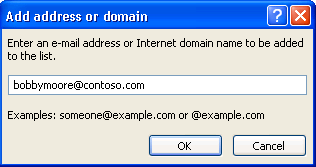
- Click Add.
- In the Enter an e-mail address or Internet domain name to be added to the list box, enter the name or address that you want to add. For example, you can add :
- a specific e-mail address, such as someone@example.com
- an Internet domain, such as @example.com, or simply example.com.
- Click OK.
Article ID: 71, Created: 9/2/2010 at 8:31 AM, Modified: 9/2/2010 at 8:31 AM